
2.5x Faster x86_64 Linux Builds on macOS with Rosetta

At the end of our article about building and deploying Linux systems from macOS we wrote that it would be great to use Apple’s Rosetta feature inside the builder VM, but that QEMU does not support it.
The wait for another solution is over:
nixpkgs now contains a new Linux builder backend that runs on Apple’s Virtualization.framework and exposes Rosetta to the guest VM.
With it, x86_64-linux builds on Apple Silicon Macs (that is ARM/aarch64) are roughly 2.5 times faster than with the QEMU-based emulation.
And they work out of the box!
The new builder is a drop-in replacement for the existing one, so switching is a matter of two extra lines in your nix-darwin configuration.
My PR was merged in August 2026, so the new builder is available in nixos-unstable today (which means that it is cached by cache.nixos.org and requires no manual bootstrapping) and will be part of NixOS 26.11.
TL;DR
If you already use nix-darwin, just add these lines to your configuration:
# file: nix-darwin configuration.nix
{
  nix = {
    linux-builder = {
      enable = true;

      # new:
      package = pkgs.darwin.linux-builder-vz;
      systems = [ "aarch64-linux" "x86_64-linux" ];
    };

    # General prerequisite
    settings.trusted-users = [ "@admin" ];
  };
}
If Rosetta is not installed on your Mac yet (it is not by default), install it first:
$ softwareupdate --install-rosetta --agree-to-licenseThen run darwin-rebuild switch and test both architectures:
$ nix build --impure --expr '(import <nixpkgs> { system = "aarch64-linux"; }).hello'
$ nix build --impure --expr '(import <nixpkgs> { system = "x86_64-linux"; }).hello'
The second command would not even work with the old QEMU-based builder default settings. Now it does, and it is fast!
The VMM behind this is called vzvm and lives at https://github.com/applicative-systems/vzvm.
The rest of this article explains why x86_64-linux builds were a sore spot on Apple Silicon and how the new builder works under the hood.
Quick Recap: nix-darwin and the Linux Builder
In case you missed our earlier macOS articles, here is the short version:
- Setting up Nix on macOS: nix-darwin lets you configure your whole Mac declaratively, and
darwin-rebuild switchapplies changes. - Build and Deploy Linux Systems from macOS:
nix.linux-builder.enable = true;runs a minimal NixOS VM as a background service that the Nix daemon uses as a remote builder over SSH. This way, Linux builds just work on a Mac. - Run NixOS Integration Tests on macOS: even the NixOS integration test driver runs on macOS.
That is all you need to know to follow the rest of this article.
The Problem: x86_64-linux Builds on Apple Silicon
The default linux-builder VM runs the same CPU architecture as the host, so on an Apple Silicon Mac it builds aarch64-linux packages only.
For x86_64-linux, it does not work at all in its default configuration.
There is an opt-in workaround:
The guest VM can be configured with boot.binfmt.emulatedSystems, which registers a QEMU user-mode emulator via the Linux kernel’s binfmt_misc mechanism.
This works, but QEMU then translates every single x86_64 instruction in software with its TCG engine, which is slow.
At the same time, every Apple Silicon Mac already ships an x86_64 translation layer:
Rosetta 2.
Apple’s Virtualization.framework can even expose Rosetta to Linux guest VMs, and NixOS supports this with the virtualisation.rosetta module.
(And no, this is not going away with Apple’s Rosetta sunset after macOS 27: that only concerns Intel Mac apps — Intel binary translation for Linux VMs and containers becomes a built-in part of macOS)
So the puzzle pieces have been there for a long time now!
The only problem was that our linux-builder runs on QEMU, which cannot use this feature.
So how much do we gain by switching the virtualization solution? These are the numbers from our vzvm benchmarks:
x86_64-linuxbuilds are 2.54x faster than QEMU withboot.binfmt.emulatedSystems.aarch64-linuxbuilds perform the same on both backends, which confirms that Rosetta makes the difference.- The VM always boots in 12 to 13 seconds, while the QEMU builder’s boot time often takes longer than 30 seconds on my system. This is not too relevant if your linux-builder always runs as a background service.
- The builder’s closure that is downloaded to your Mac shrinks from roughly 3.2 GiB to 1.2 GiB.
A Purpose-Built VMM as a Drop-In Replacement
For a while I experimented with running the builder VM on existing general-purpose VM runners for macOS. But mapping the existing linux-builder onto them always made the setup more complex instead of simpler: The need to handle configuration files, disk image conversions, networking settings, and extra daemons was annoying. The whole point of the nix-darwin linux-builder module is that users don’t have to care about any of this. I wanted something that just works.
So I wrote vzvm, a minimal VM monitor that does exactly what the linux-builder use case needs and nothing else. It is roughly 1000 lines of Swift with no dependencies apart from Apple’s Foundation and Virtualization frameworks. A few design decisions keep it simple:
- The Linux kernel and initrd are booted directly with
VZLinuxBootLoader. There is no bootloader, no EFI system partition, and no mutable system disk image to prepare. - The Nix store of the guest system is packed into a read-only EROFS image that is cached by closure hash. This is where the predictable boot times come from.
- Outbound networking uses the NAT attachment of Virtualization.framework, which needs no configuration at all.
- NAT means that inbound SSH connections cannot reach the guest directly, so the SSH port is forwarded into the VM through a vsock socket instead. No network setup, no root privileges, no firewall config.
- Rosetta is mounted into the guest, where the
virtualisation.rosettaNixOS module registers it via binfmt_misc as the handler for x86_64 binaries.
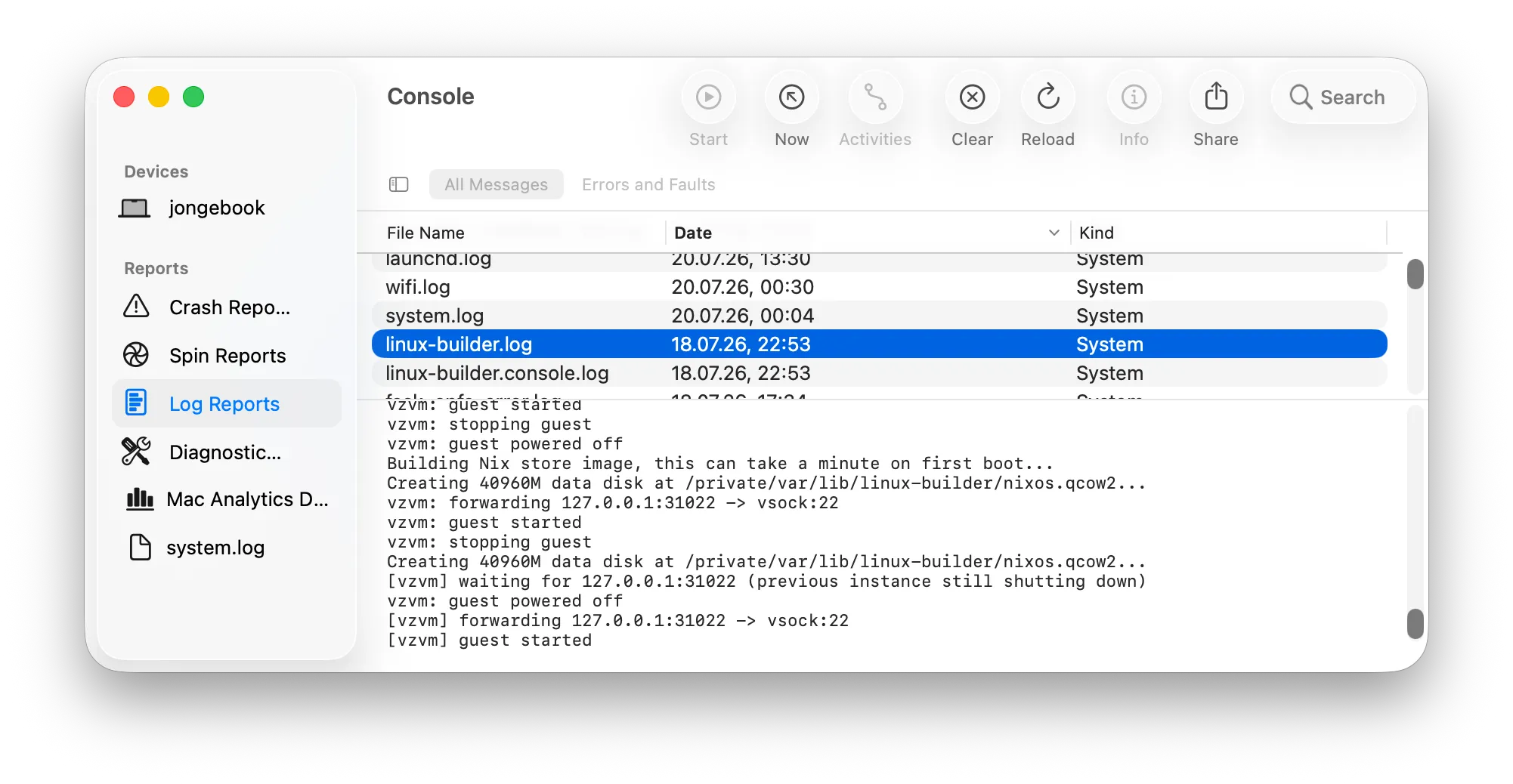
If you ever wonder what the builder VM is doing in the background, have a look at the Console app that ships with macOS:
The vzvm messages and the guest VM console output go into linux-builder.log and linux-builder.console.log files in the “Log Reports” section, and vzvm also logs to the macOS unified logging system under the subsystem systems.applicative.vzvm.
From the outside, nothing changes:
The builder still listens on localhost port 31022, uses the same SSH host key and builder identity as the QEMU-based builder, and is managed by the same launchd service.
The /etc/nix/machines entry, the SSH host alias, and all the tuning options that we showed in the linux-builder article (ephemeral, maxJobs, disk size, memory size, CPU cores) work exactly the same.
This is why the switch is really just the package and systems lines from the TL;DR section.
As with the old builder, the default settings (1 CPU core, 3GB RAM, 20GB disk) are too small for real-life builds. For reference, this is what I run on my own MacBook:
# file: nix-darwin configuration.nix
{
  nix.linux-builder = {
    # General enabling of the builder
    enable = true;
    package = pkgs.darwin.linux-builder-vz;
    systems = [ "aarch64-linux" "x86_64-linux" ];

    # Performance/tuning settings
    ephemeral = true;
    maxJobs = 4;
    config = {
      virtualisation = {
        darwin-builder = {
          diskSize = 40 * 1024;
          memorySize = 8 * 1024;
        };
        cores = 6;
      };
    };
  };
}
This gives the builder 6 CPU cores, 8GB RAM, and 40GB disk size, and accepts up to 4 concurrent build jobs.
The ephemeral flag deletes the builder’s disk image on every restart, so configuration changes always apply cleanly.
All these options are not new and are explained in more detail in the linux-builder article.
Of course, this specialization comes with a trade-off: vzvm has no display, no snapshots, no bridged networking, and no cloud-init support. If you want to run general-purpose Linux VMs on your Mac, tools like vfkit, Lima, or UTM are a much better fit. But if your VM is a Nix remote builder, vzvm gives you the simplest possible setup.
Building and Deploying NixOS Machines from the Mac
My favorite part is what this does to real-world workflows.
I personally find it very comfortable now to build complete NixOS systems for both x86_64-linux and aarch64-linux machines directly from my Mac and then deploy them remotely:
$ nixos-rebuild switch \
    --fast \
    --target-host myserver \
    --flake .#myserver \
    --use-remote-sudo \
    --use-substitutes
(For more details, refer to the remote deployment section of the linux-builder article)
The funny thing is that this is now even faster than on my Linux machines:
On an aarch64-linux machine, building an x86_64-linux system needs boot.binfmt.emulatedSystems with QEMU emulation (or you set up cross-compilation, which works generally well but some packages don’t cross compile cleanly), and the other way around.
My Mac with Rosetta outruns them.
Two years ago, the Mac was the platform where Linux builds were the awkward special case.
Now it handles both major Linux architectures at competitive speed, out of the box.
Bonus: NixOS Integration Tests with Nested Virtualization
The NixOS integration test driver runs on macOS, but the tests themselves need a builder that provides KVM. The QEMU-based builder could not provide that.
vzvm supports nested virtualization, so the builder VM can provide /dev/kvm to run NixOS integration tests:
# file: nix-darwin configuration.nix
{
  nix.linux-builder = {
    enable = true;
    package = pkgs.darwin.linux-builder-vz;

    config.virtualisation.vz.nestedVirtualization = true;
  };
}
This needs macOS 15 or newer and an M3 chip or newer, as Apple’s documentation states that “Nested virtualization is available for Mac with the M3 chip, and later.”
Summary
The gap that we described at the end of our linux-builder article two years ago is now closed.
With pkgs.darwin.linux-builder-vz, your Mac builds x86_64-linux packages through Rosetta at 2.5 times the speed of QEMU emulation, downloads a much smaller builder closure, boots predictably, and can even run NixOS integration tests.
And because it is a drop-in replacement, upgrading is just a few lines of nix-darwin configuration and one darwin-rebuild switch.
Thanks to arianvp for their thorough review of the nixpkgs integration. And of course thanks to Gabriella Gonzalez’s original linux-builder and Enzime’s nix-darwin module, already mentioned in the linux-builder article.
The vzvm source code is at https://github.com/applicative-systems/vzvm.
We help our customer orgs transfer from other Linux-based solutions to NixOS or improve their existing NixOS-based solutions, while at the same time improving the developer experience. From that experience, we can help you copy the successful patterns of winning organizations and avoid the patterns that have not worked well elsewhere, instead of having to make this experience yourself from scratch. No matter if you just need a quick consultation on how to build something with Nix or if we can help you by lending developer time, schedule a quick call with us or e-mail us.